OI Agents > Agentic Workflows -
Templates Library -
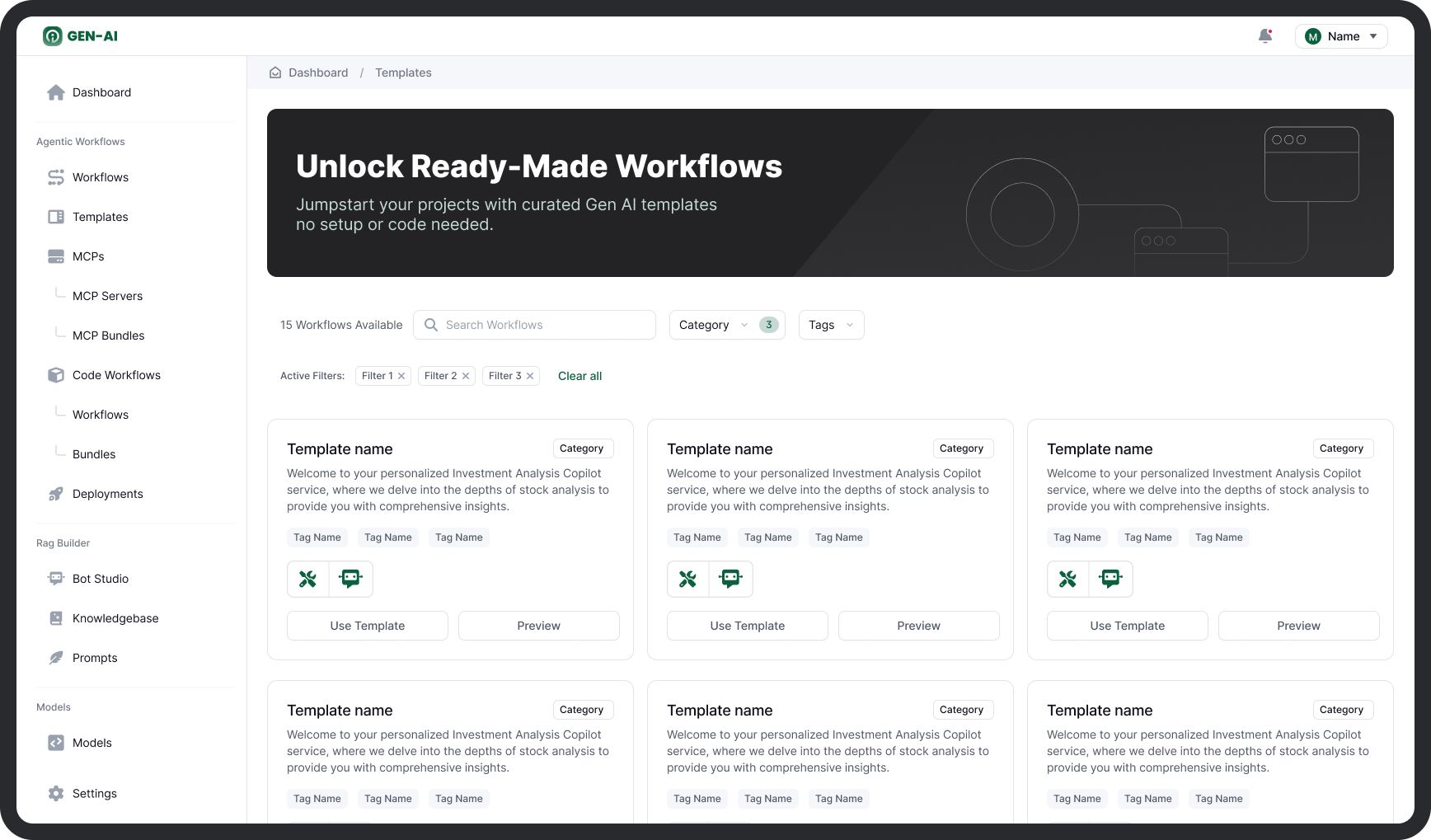
The Templates Library offers a curated collection of ready-to-use AI workflows designed for common enterprise use cases. Templates allow you to instantly bootstrap your automation, copilots, and agent-based systems without building from scratch.
Each template includes pre-configured tasks, agents, tools, and handoffs, all of which can be customized after import.
Key Features
| Feature | Description |
|---|---|
| Search & Filter | Search by name, and filter by categories or tags to find workflows relevant to your domain (e.g. finance, legal, operations). |
| Preview Mode | View template details including workflow structure, use case summary, and required configurations before importing. |
| One-Click Launch | Use any template directly into the canvas for customization and deployment. |
| Fully Editable | After import, every element of the workflow, tasks, agents, tools, prompts, models, can be edited or extended. |
| Categorization & Tagging | Templates are grouped by use case category (e.g. “Report Generation”) and can be tagged for filtering (e.g. “LLM”, “RAG”, “External API”). |
Using a Template
To use a workflow template:
- Navigate to the Templates tab in the sidebar.
- Use the search bar, category dropdown, or tag filters to browse.
- Click Preview to review a template's details.
- Click Use Template to import it directly into the Workflow Canvas.
- Customize agents, models, instructions, or tools as needed.
- Deploy and run the workflow.
Once imported, a template behaves like any other editable workflow.
Common Template Use Cases
| Category | Example Workflows |
|---|---|
| Business Intelligence | Automated KPI dashboards, revenue intelligence, market trend analysis |
| Customer Support | Ticket triage assistants, escalation agents, RAG-based support copilots |
| Document Automation | Contract extraction, policy summarization, invoice compliance agents |
| Marketing Ops | Campaign planning, SEO summarizers, real-time competitor research |
| Internal Enablement | HR FAQ bots, onboarding copilots, internal data retrieval agents |
Best Practices
- Use templates as a starting point, not final product, refine agent instructions and tools to fit your org’s data and APIs.
- Save frequently used templates as internal standards for reuse across teams.
- Tag templates clearly when creating new ones to enable better search and governance.